

Let’s face it. AI is changing the way we work. If you are a coder, you already know about Claude Code. But here is the big news. Claude Code is officially coming to Slack. This isn’t just another small update. It is a massive shift in how teams build software together. For many, this is a productivity revolution.
By bringing an AI coding assistant directly into your chat, work gets easier. You no longer have to jump between five different apps. Everything happens where your team already hangs out. This minimizes task-switching and ensures the whole team stays aligned. It accelerates the pace of work for every developer on the team.
This integration promises faster fixes and smarter suggestions. It makes Claude Code for developers more accessible than ever before. In this guide, we will look at why this matters. We will explore the features and the practical use cases. We will also see how AI productivity tools are shaping the future of communication. Let’s dive in.
2. Understanding Claude Code: The Next Gen AI Coding Assistant
So, what exactly is Claude Code? It is a powerful tool built on advanced AI models. It helps you write code, find bugs, and explain complex logic. Unlike older tools, it actually understands the context of your project. It learns from your team’s past interactions to provide better answers.
This tool is designed to make you faster and smarter. It turns Slack into a central hub for all things development. You can ask it to generate a function or review a pull request. It feels like having a senior developer sitting right next to you. This is why Claude Code is quickly becoming a favorite for many.
One major plus is how it handles documentation. We all know that writing docs is a chore. Claude Code can do it for you automatically. It keeps your project organized without the extra effort. By using these AI productivity tools, you save hours of boring work every single week.
How Claude Code Stands Out
- Slack-First Design: It lives where you talk. You don’t have to leave the conversation to get help.
- Real-Time Review: It checks your code for errors as you share it in the channel.
- Context Awareness: It knows your project history and team style.
- Seamless Integration: It connects with your IDE and your CI/CD pipelines easily.
3. Why the Claude Code Slack Integration is a Game Changer

Slack is the heart of the modern office. Whether you are a remote or a hybrid team, you live in Slack. Integrating Claude Code into this space makes perfect sense. It ensures that real-time coding assistance is always just one message away. You don’t have to break your flow to find an answer.
The biggest benefit here is the context switching reduction. Every time you leave Slack to check a tool, you lose focus. It takes time for your brain to get back into the “zone.” With the Claude Code Slack integration, that problem goes away. You get real-time AI coding support without ever closing your chat window.
This also brings transparency to the team. When someone asks the AI a question, everyone sees the answer. This creates a natural way to share knowledge. It helps junior developers learn faster by watching how others interact with the AI. This is a key part of AI team collaboration in the modern world.
4. Key Features of Claude Code for Developers on Slack
Let’s talk about what this tool can actually do. First, it offers AI-driven code suggestions. You can type a prompt in a channel, and it will give you a code snippet. It’s perfect for generating boilerplate code or simple logic. This is a core part of coding automation in Slack.
Second, it provides AI-assisted code review. You can paste a block of code, and the AI will look for bugs. It can even suggest ways to make the code faster or cleaner. This helps maintain high quality across the entire project. It acts as a safety net for your team’s output.
Third, it helps with knowledge management in Slack. Often, the answer to a problem is buried in an old chat. The AI can find that information for you. It can answer questions about how a specific part of your system works. This makes developer workflow optimization much easier for everyone involved.
5. Practical Use Cases for AI Collaboration for Developers
How can this be applied in practical situations? For a single developer, it’s great for automated debugging tools. If you get an error, just paste it into Slack. The AI will explain what went wrong and how to fix it. This is a huge time saver when you are stuck on a tricky bug.
For teams, it makes AI collaboration for developers seamless. You can work on a coding challenge together in a single channel. The AI can offer different perspectives or solutions. It helps the team reach a decision faster. This is especially helpful for remote team coding tools where you can’t walk over to a desk.
Managers also love this tool. It allows them to see how work is moving in real-time. They can check code quality without micromanaging the staff. By using Claude Code, managers can plan resources better. They get a clear view of the team’s progress and any blockers they might face.
Smart Ways to Use Claude Code
- Onboarding: Use the AI to explain the codebase to new hires in private channels.
- Boilerplate: Generate repetitive code structures in seconds to stay focused on logic.
- Bug Squashing: Share an error log and let the AI find the root cause instantly.
- Documentation: Ask the AI to summarize a long thread into a clear project update.
6. Boosting Hybrid Team Productivity with AI
The world has changed. A lot of people now do at least part of their work from home. This makes hybrid team productivity a top priority. It can be challenging to communicate across different time zones.. Claude Code helps bridge that gap by providing 24/7 support.
If a developer is working late, they don’t have to wait for a colleague to wake up. They can ask the AI coding assistant for help. This keeps the project moving around the clock. It is a strategic advantage for any company using AI team collaboration strategies.
Furthermore, this integration helps standardize coding practices. The AI can be trained to follow your team’s specific style guide. This ensures that everyone’s code looks the same, regardless of where they are working. It is a simple way to improve coding workflow efficiency across a global team.
7. Challenges and Security in Slack Integration for Coding
We have to be honest. There are always challenges with new tech. The biggest one is security. You are sharing code in a chat app. You must make sure your Claude Code Slack integration is secure. Most enterprise versions of Slack offer strong encryption. However, handling sensitive data still requires caution.
Another challenge is accuracy. No AI is perfect. You should never copy and paste AI code without checking it first. Human oversight is still the most important part of the process. Claude Code for developers is a tool, not a replacement for your brain. Ultimately, you remain accountable for the end result.
Finally, there is the issue of “tool fatigue.” Sometimes, having too many Slack AI tools can be confusing. You need to make sure your team knows how to use them correctly. Begin with a small test team before implementing it across the entire organization. This ensures a smooth transition and better developer collaboration software usage.
8. Measuring the Impact on Developer Workflow Optimization
How do you know if it’s working? You should track your metrics. Look at how long it takes to finish a code review. See if the number of bugs in production goes down. Most teams see a big jump in AI-powered coding productivity within the first month.
You should also look at “soft” metrics. Check in with your team to see if their stress levels have decreased. Check if they are spending less time in meetings and more time coding. The goal of Claude Code is to give you your time back. If the team is happier and more focused, the tool is doing its job.
Long-term, this leads to better project delivery. When you have real-time coding assistance, you can hit deadlines more reliably. You spend less time fighting with tools and more time building great features. This is the ultimate goal of developer workflow optimization in a competitive market.
9. The Future of AI Productivity Tools

We are just at the beginning. Claude Code is part of a bigger trend. We are moving toward “AI-first” communication. This means your chat apps will do more than just send text. They will become active partners in your work. We might soon see these tools in Notion, Jira, or even Microsoft Teams.
The success of the Claude Code Slack integration sets a new bar. It shows that AI works best when it is where the people are. We will likely see more coding automation in Slack in the coming years. This will make software development faster and more inclusive for everyone.
As these tools get better, the role of the developer will change. We will spend less time on syntax and more time on architecture. We will become “directors” of AI systems. Right now is a thrilling moment to work in the tech industry. By mastering Claude Code, you are preparing yourself for the future of the industry.
10. Conclusion: Why You Should Try Claude Code Today
The Claude Code Slack integration is more than just a convenience. it is a way to work faster, stay focused, and build better software. It brings the power of an AI coding assistant into your daily conversations. This is the future of AI collaboration for developers.
By reducing context switching, you keep your brain sharp. By using coding automation in Slack, you get rid of boring tasks. Whether you are a solo dev or part of a big team, Claude Code has something to offer. It is one of the most effective AI productivity tools available right now.
The world of coding is moving fast. Don’t get left behind. Start exploring Claude Code for developers today. See how it can change your workflow and improve your team’s output. The era of smarter, faster, and more collaborative coding is here.
10. FAQs: Claude Code and Slack
What is Claude Code?
It is an AI coding assistant designed to help developers write and debug code. It uses advanced language models to understand context and provide smart suggestions.
How does Claude Code work in Slack?
It works through a Slack integration for coding. You can chat with it in channels or direct messages. It can generate code, review snippets, and help with documentation.
Can Claude Code replace developers?
No. It is meant to be an assistant. You still need a human to make high-level decisions and check for errors. It is one of the top AI productivity tools, but it is not a person.
Is it safe to share code in Slack?
Yes, as long as you follow your company’s security rules. Ensure you are using a secure version of Slack and that the Claude Code settings are configured correctly.
1. Introduction
Let’s face it. AI is changing the way we work. If you are a coder, you already know about Claude Code. But here is the big news. Claude Code is officially coming to Slack. This isn’t just another small update. It is a massive shift in how teams build software together. For many, this is a productivity revolution.
By bringing an AI coding assistant directly into your chat, work gets easier. You no longer have to jump between five different apps. Everything happens where your team already hangs out. This minimizes task-switching and ensures the whole team stays aligned. It accelerates the pace of work for every developer on the team.
This integration promises faster fixes and smarter suggestions. It makes Claude Code for developers more accessible than ever before. In this guide, we will look at why this matters. We will explore the features and the practical use cases. We will also see how AI productivity tools are shaping the future of communication. Let’s dive in.
2. Understanding Claude Code: The Next Gen AI Coding Assistant
So, what exactly is Claude Code? It is a powerful tool built on advanced AI models. It helps you write code, find bugs, and explain complex logic. Unlike older tools, it actually understands the context of your project. It learns from your team’s past interactions to provide better answers.
This tool is designed to make you faster and smarter. It turns Slack into a central hub for all things development. You can ask it to generate a function or review a pull request. It feels like having a senior developer sitting right next to you. This is why Claude Code is quickly becoming a favorite for many.
One major plus is how it handles documentation. We all know that writing docs is a chore. Claude Code can do it for you automatically. It keeps your project organized without the extra effort. By using these AI productivity tools, you save hours of boring work every single week.
How Claude Code Stands Out
- Slack-First Design: It lives where you talk. You don’t have to leave the conversation to get help.
- Real-Time Review: It checks your code for errors as you share it in the channel.
- Context Awareness: It knows your project history and team style.
- Seamless Integration: It connects with your IDE and your CI/CD pipelines easily.
3. Why the Claude Code Slack Integration is a Game Changer
Slack is the heart of the modern office. Whether you are a remote or a hybrid team, you live in Slack. Integrating Claude Code into this space makes perfect sense. It ensures that real-time coding assistance is always just one message away. You don’t have to break your flow to find an answer.
The biggest benefit here is the context switching reduction. Every time you leave Slack to check a tool, you lose focus. It takes time for your brain to get back into the “zone.” With the Claude Code Slack integration, that problem goes away. You get real-time AI coding support without ever closing your chat window.
This also brings transparency to the team. When someone asks the AI a question, everyone sees the answer. This creates a natural way to share knowledge. It helps junior developers learn faster by watching how others interact with the AI. This is a key part of AI team collaboration in the modern world.
4. Key Features of Claude Code for Developers on Slack
Let’s talk about what this tool can actually do. First, it offers AI-driven code suggestions. You can type a prompt in a channel, and it will give you a code snippet. It’s perfect for generating boilerplate code or simple logic. This is a core part of coding automation in Slack.
Second, it provides AI-assisted code review. You can paste a block of code, and the AI will look for bugs. It can even suggest ways to make the code faster or cleaner. This helps maintain high quality across the entire project. It acts as a safety net for your team’s output.
Third, it helps with knowledge management in Slack. Often, the answer to a problem is buried in an old chat. The AI can find that information for you. It can answer questions about how a specific part of your system works. This makes developer workflow optimization much easier for everyone involved.
5. Practical Use Cases for AI Collaboration for Developers
How can this be applied in practical situations? For a single developer, it’s great for automated debugging tools. If you get an error, just paste it into Slack. The AI will explain what went wrong and how to fix it. This is a huge time saver when you are stuck on a tricky bug.
For teams, it makes AI collaboration for developers seamless. You can work on a coding challenge together in a single channel. The AI can offer different perspectives or solutions. It helps the team reach a decision faster. This is especially helpful for remote team coding tools where you can’t walk over to a desk.
Managers also love this tool. It allows them to see how work is moving in real-time. They can check code quality without micromanaging the staff. By using Claude Code, managers can plan resources better. They get a clear view of the team’s progress and any blockers they might face.
Smart Ways to Use Claude Code
- Onboarding: Use the AI to explain the codebase to new hires in private channels.
- Boilerplate: Generate repetitive code structures in seconds to stay focused on logic.
- Bug Squashing: Share an error log and let the AI find the root cause instantly.
- Documentation: Ask the AI to summarize a long thread into a clear project update.
6. Boosting Hybrid Team Productivity with AI

The world has changed. A lot of people now do at least part of their work from home. This makes hybrid team productivity a top priority. It can be challenging to communicate across different time zones.. Claude Code helps bridge that gap by providing 24/7 support.
If a developer is working late, they don’t have to wait for a colleague to wake up. They can ask the AI coding assistant for help. This keeps the project moving around the clock. It is a strategic advantage for any company using AI team collaboration strategies.
Furthermore, this integration helps standardize coding practices. The AI can be trained to follow your team’s specific style guide. This ensures that everyone’s code looks the same, regardless of where they are working. It is a simple way to improve coding workflow efficiency across a global team.
7. Challenges and Security in Slack Integration for Coding
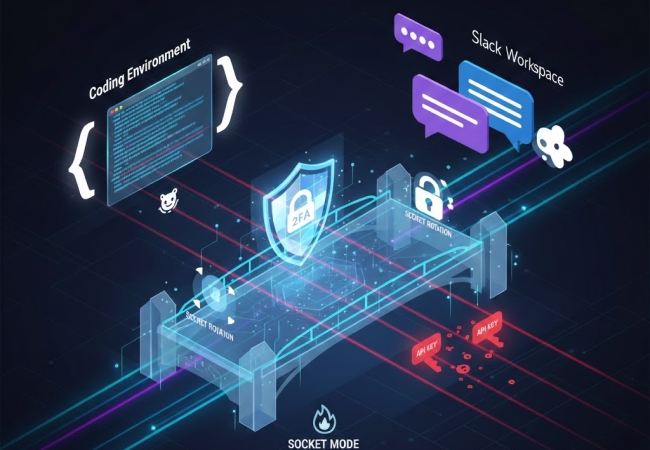
We have to be honest. There are always challenges with new tech. The biggest one is security. You are sharing code in a chat app. You must make sure your Claude Code Slack integration is secure. Most enterprise versions of Slack offer strong encryption. However, handling sensitive data still requires caution.
Another challenge is accuracy. No AI is perfect. You should never copy and paste AI code without checking it first. Human oversight is still the most important part of the process. Claude Code for developers is a tool, not a replacement for your brain. Ultimately, you remain accountable for the end result.
Finally, there is the issue of “tool fatigue.” Sometimes, having too many Slack AI tools can be confusing. You need to make sure your team knows how to use them correctly. Begin with a small test team before implementing it across the entire organization. This ensures a smooth transition and better developer collaboration software usage.
8. Measuring the Impact on Developer Workflow Optimization
How do you know if it’s working? You should track your metrics. Look at how long it takes to finish a code review. See if the number of bugs in production goes down. Most teams see a big jump in AI-powered coding productivity within the first month.
You should also look at “soft” metrics. Check in with your team to see if their stress levels have decreased. Check if they are spending less time in meetings and more time coding. The goal of Claude Code is to give you your time back. If the team is happier and more focused, the tool is doing its job.
Long-term, this leads to better project delivery. When you have real-time coding assistance, you can hit deadlines more reliably. You spend less time fighting with tools and more time building great features. This is the ultimate goal of developer workflow optimization in a competitive market.
9. The Future of AI Productivity Tools
We are just at the beginning. Claude Code is part of a bigger trend. We are moving toward “AI-first” communication. This means your chat apps will do more than just send text. They will become active partners in your work. We might soon see these tools in Notion, Jira, or even Microsoft Teams.
The success of the Claude Code Slack integration sets a new bar. It shows that AI works best when it is where the people are. We will likely see more coding automation in Slack in the coming years. This will make software development faster and more inclusive for everyone.
As these tools get better, the role of the developer will change. We will spend less time on syntax and more time on architecture. We will become “directors” of AI systems. Right now is a thrilling moment to work in the tech industry. By mastering Claude Code, you are preparing yourself for the future of the industry.
10. Conclusion: Why You Should Try Claude Code Today
The Claude Code Slack integration is more than just a convenience. it is a way to work faster, stay focused, and build better software. It brings the power of an AI coding assistant into your daily conversations. This is the future of AI collaboration for developers.
By reducing context switching, you keep your brain sharp. By using coding automation in Slack, you get rid of boring tasks. Whether you are a solo dev or part of a big team, Claude Code has something to offer. It is one of the most effective AI productivity tools available right now.
The world of coding is moving fast. Don’t get left behind. Start exploring Claude Code for developers today. See how it can change your workflow and improve your team’s output. The era of smarter, faster, and more collaborative coding is here.
10. FAQs: Claude Code and Slack
What is Claude Code?
It is an AI coding assistant designed to help developers write and debug code. It uses advanced language models to understand context and provide smart suggestions.
How does Claude Code work in Slack?
It works through a Slack integration for coding. You can chat with it in channels or direct messages. It can generate code, review snippets, and help with documentation.
Can Claude Code replace developers?
No. It is meant to be an assistant. You still need a human to make high-level decisions and check for errors. It is one of the top AI productivity tools, but it is not a person.
Is it safe to share code in Slack?
Yes, as long as you follow your company’s security rules. Ensure you are using a secure version of Slack and that the Claude Code settings are configured correctly.





Leave a Reply